
Connecting a camera to Ignition: a lost camera must never read as clear
In 10 seconds
- The problem: if vision only reports yes or no, a dead camera can look like a clear area.
- The fix: publish three states, Active, Clear, and Unknown, and treat Unknown as a stop in Ignition.
- You can test this at home with a Raspberry Pi camera, Ignition, and a small machine you can safely stop.
The problem
Plants already have cameras and SCADA, but connecting them usually means custom vision work for every machine. The harder part comes later: what does SCADA do when the camera freezes, the network drops, or the model call fails?
A yes or no output cannot tell the difference between "nothing is there" and "I can no longer see". If the last answer was no, the screen keeps saying the area is clear, while nobody is actually watching it.
No data is not good news. It means you do not know.
The fix: three states, not two
- Active: the rule is met on a fresh, confirmed observation.
- Clear: the rule is not met on a fresh, confirmed observation.
- Unknown: there is no current result, for example a lost camera or a failed model call. It never means clear.
Integrators should treat Unknown or Bad quality as a stop. In my demo, an Ignition Perspective project latches a stop on Active, or when vision stays Unknown or Bad quality for 2 seconds.
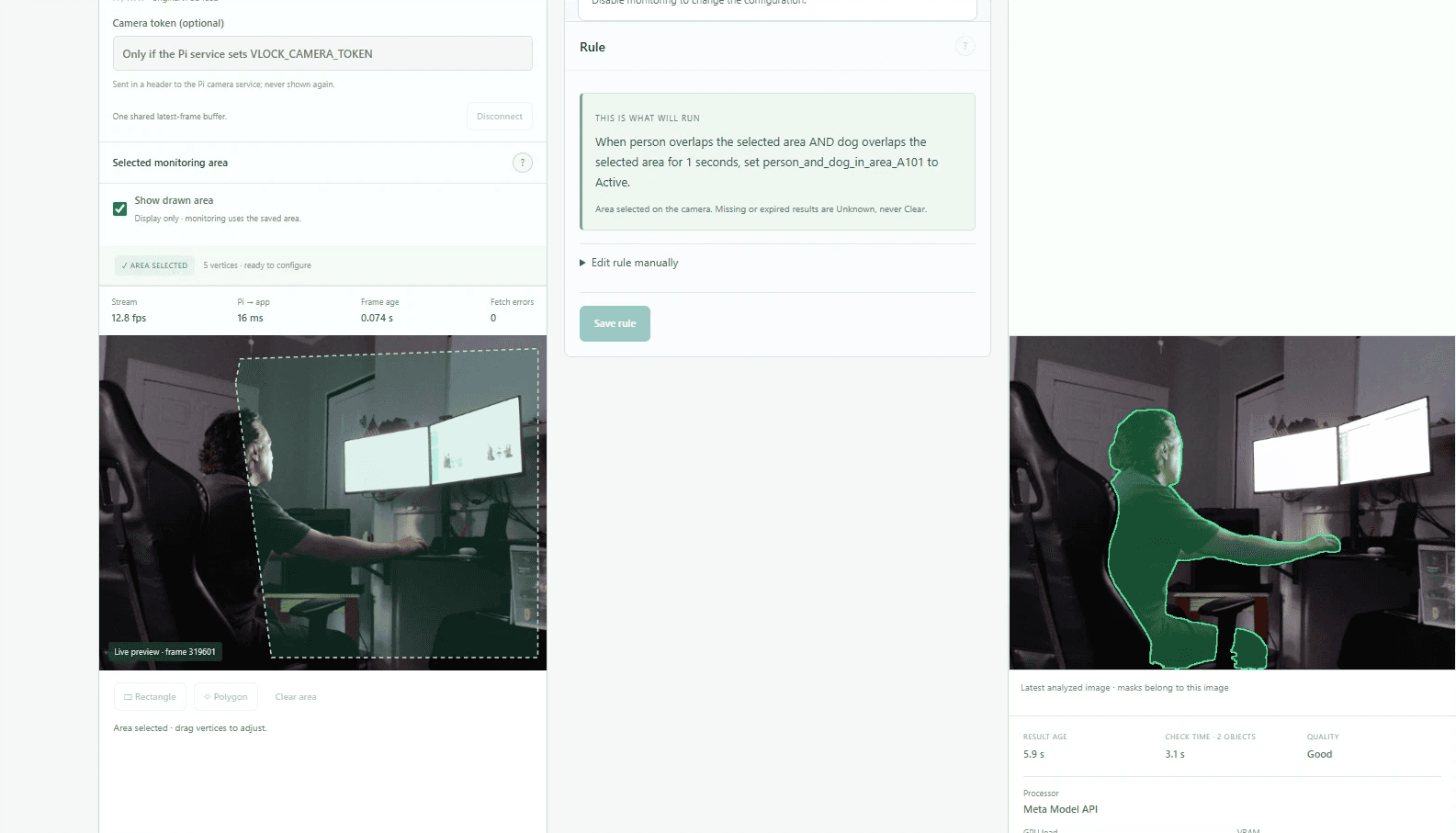
How it reaches Ignition
I built this as vLock-AI Vision. You describe a rule in plain English, Muse Spark proposes it, a person approves it, and SAM 3.1 checks the camera. Fixed code then applies the approved rule and publishes the same tags for every zone over OPC UA, MQTT, or REST. Ignition users can download a ready-made UDT.
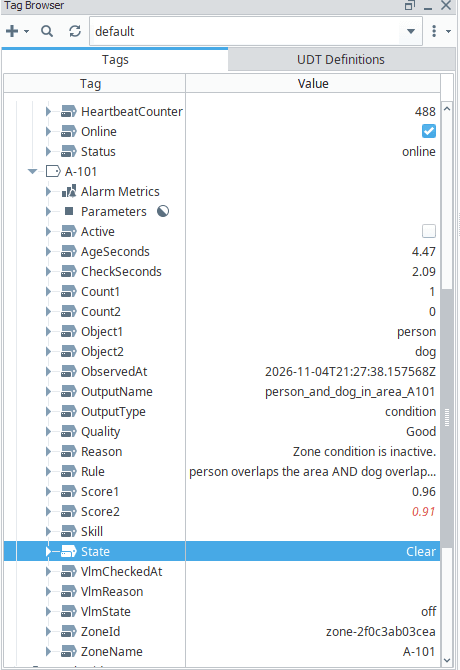
The app sends no machine commands and keeps no stop latch. It reports what it sees, and SCADA decides what the machine does. Latching and reset belong to the integrator, as they would in a real plant.
How to test an industrial application in a home lab
You do not need a plant to test the logic. You need the same software on the control side, plus a small machine that is safe to stop. Here is my setup:
- Camera: a Raspberry Pi 5 with a USB camera.
- SCADA: real Inductive Automation Ignition with Perspective. Ignition offers a free Maker Edition for personal projects.
- Machine: a Bambu Lab P1S 3D printer, connected over local MQTT. It has a real pause command, and a wrong stop only costs one print.
Then test the failures, not just the happy path. These are my results from November 4, 2026, observed by hand on both a local GPU and Meta's cloud, so no reaction times were measured. The test rule was a person AND a dog in the area.
- Person alone: Clear. No stop.
- Person holding a real dog: Active. Stop latched, printer stopped.
- Camera disabled: Unknown. Treated as a stop, printer stopped.
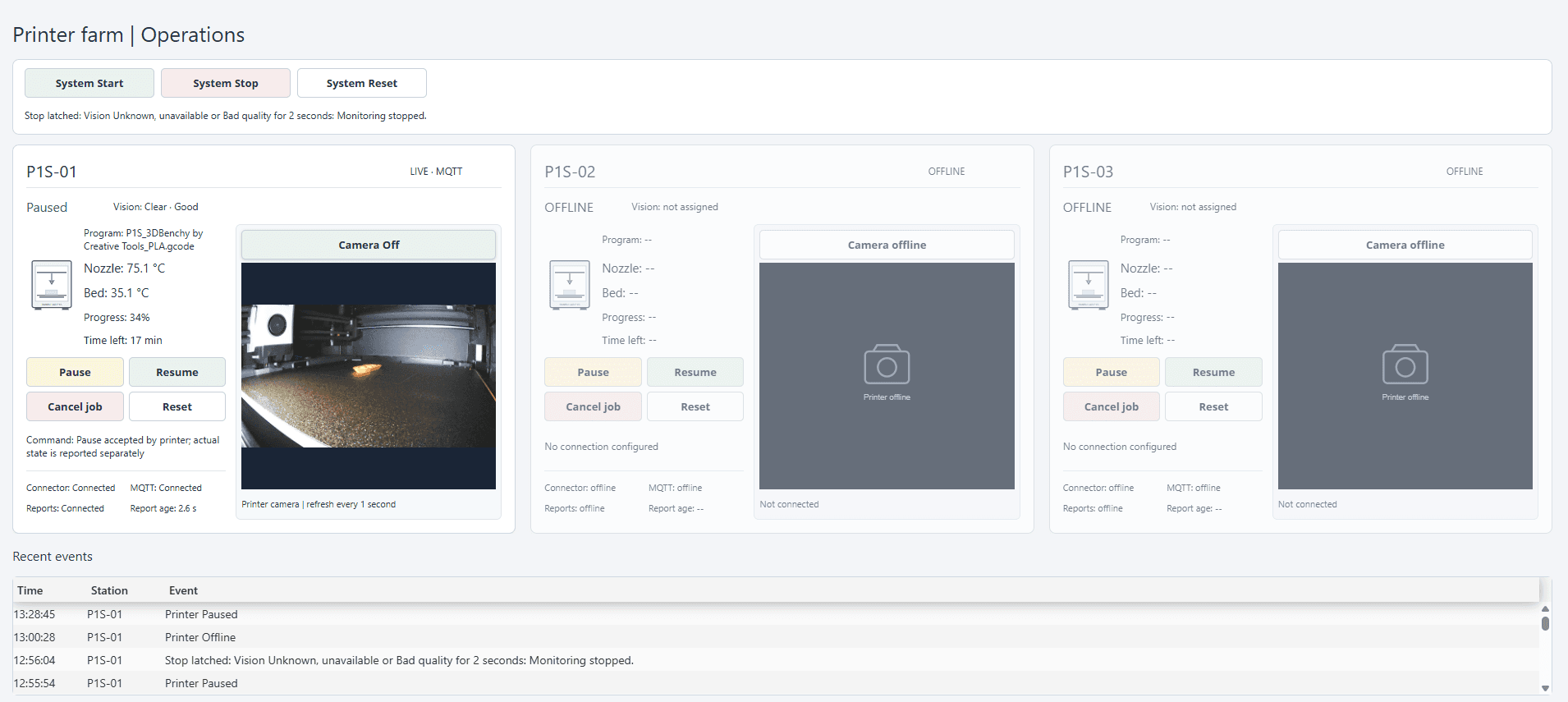
What a home lab proves, and what it does not
- It can prove: the tags, stale-data handling, stop and reset logic, and operator screens.
- It cannot prove: accuracy under plant lighting, dust, and vibration, behavior on a plant network, or safety validation.
- Still on my test list: a physical cable unplug, and the example latch and heartbeat scripts in a real gateway.
Measured speed
- Meta image API, 1 frame: 2 to 3 seconds per check.
- Local GPU (RTX 3070 Ti Laptop), 4 frames: 4 to 5 seconds per check.
- Meta video API, 4 frames: 8 to 17 seconds per check, too slow for this use today.
These numbers come from one camera in one room. Your results will differ.
The limits
- It is a working prototype for supervisory monitoring, not a fast safety stop.
- It does not replace physical lockout/tagout or safety-rated controls.
- It handles one camera and one monitoring job at a time.
- Accuracy has only been sampled, not benchmarked.
- Muse Spark's proposals need human review. In one test it got the rule right but chose the wrong output type.
Would this work with a PLC machine?
SCADA can apply the same logic to other machines, but I have only tested this on a 3D printer. On a real machine, the stop logic and its safety review stay with the people who own that machine.
Where vMaint fits
A stop only helps if someone finds out why it happened and fixes the cause. That is the problem I work on with vMaint, my maintenance and downtime software. The two are not connected today, but a vision stop that opens a downtime record is the direction I want to test next.
I submitted vLock-AI Vision to the Meta Global AI Developer Hackathon 2026. If you work with Ignition, please try to break it and tell me what you find.